How to Manage Events from Email in Exchange Online PowerShell

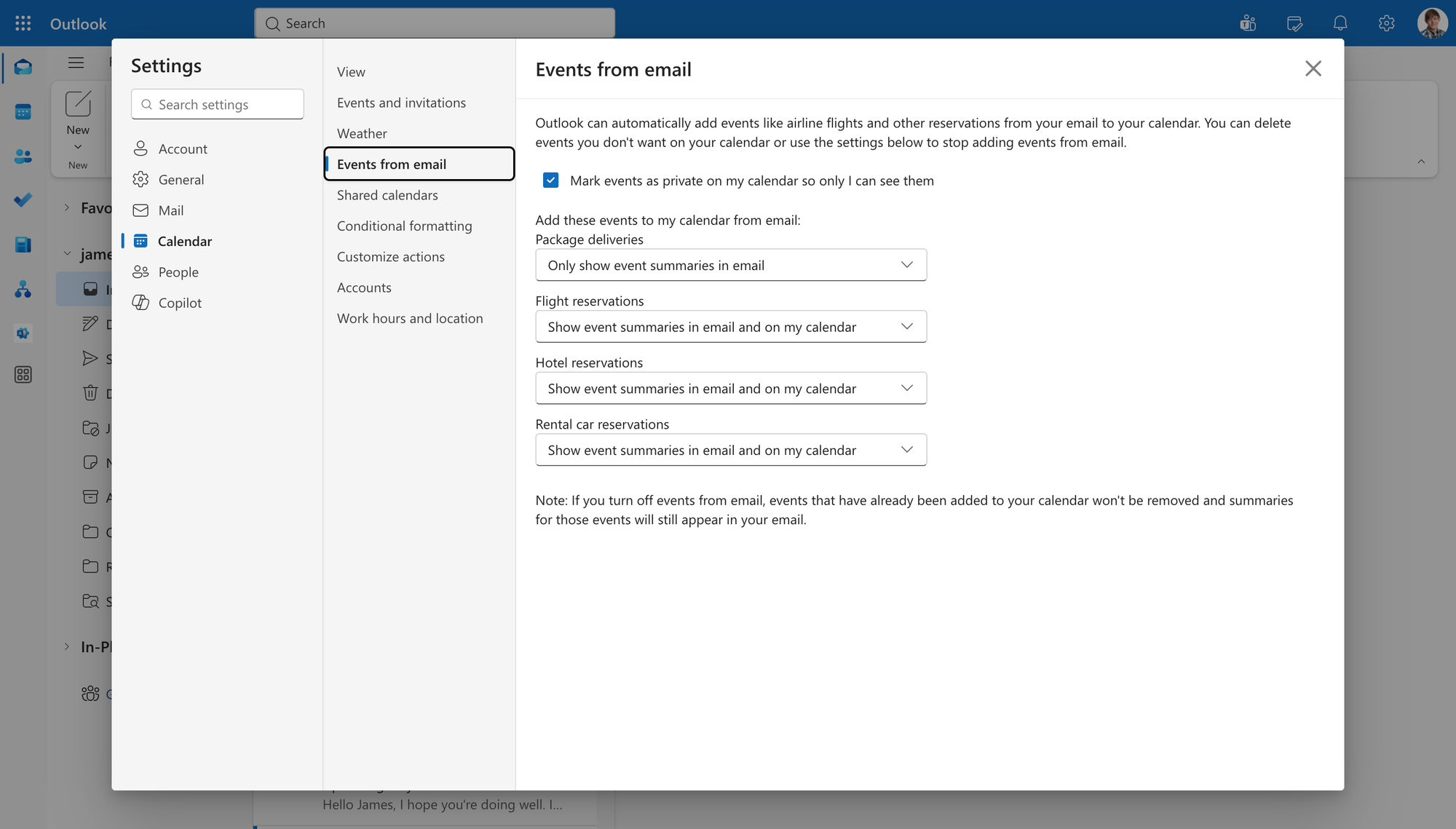
Exchange Online can create calendar items from information found in email messages, such as flight reservations, hotel bookings, dining reservations, and package deliveries. For administrators, this can be useful, but it can also add calendar items that users or organizations do not want.
The events from email PowerShell settings in Set-MailboxCalendarConfiguration let administrators control this behavior per mailbox. You can disable the parent feature completely, leave it enabled while turning off specific supported categories, control whether created events are marked Private, and configure invoice handling.
The events-from-email parameters covered in this guide are available only in the cloud-based service, meaning Exchange Online. Microsoft lists Set-MailboxCalendarConfiguration itself for both Exchange Online and on-premises Exchange, but the events-from-email parameters discussed here are Exchange Online-only settings.
For a wider reference covering the cmdlet, see Set-MailboxCalendarConfiguration PowerShell.
How Events from Email Works
EventsFromEmailEnabled is the parent setting that controls whether creating events from email messages is enabled for a mailbox.
Microsoft documents the following values:
- $true: Creating events from email is enabled. This is the default.
- $false: Creating events from email is disabled.
Microsoft explicitly identifies six category-specific parameters that can be enabled or disabled when EventsFromEmailEnabledis $true:
- DiningEventsFromEmailEnabled
- EntertainmentEventsFromEmailEnabled
- FlightEventsFromEmailEnabled
- HotelEventsFromEmailEnabled
- PackageDeliveryEventsFromEmailEnabled
- RentalCarEventsFromEmailEnabled
These category controls are meaningful only while the parent EventsFromEmailEnabled setting is $true.
This gives administrators two levels of control. Setting the parent property to $false disables events from email altogether. Keeping the parent property enabled allows the documented categories to be configured independently.
Most of those category settings default to $true. Package delivery is the exception: Microsoft documents $false as the default for PackageDeliveryEventsFromEmailEnabled.
InvoiceEventsFromEmailEnabled is also available in Exchange Online, but Microsoft documents it separately rather than listing it among the six category controls governed by EventsFromEmailEnabled. Its documentation says that $true, the default, enables creating invoices from messages and $false disables it. Microsoft does not document a dependency between this parameter and EventsFromEmailEnabled, so one should not be assumed.
Events from email are also separate from calendar reminder settings. If you need to manage when reminders appear or whether they are enabled, see Outlook Calendar Reminders with PowerShell.
Events-from-Email Parameters
Microsoft documents CreateEventsFromEmailAsPrivate as $true by default. With $true, events created from email are marked Private. With $false, they are created as Normal. This setting changes the privacy status rather than enabling or disabling event creation.
The Identity parameter identifies the mailbox. An email address, UPN, GUID, alias, name, and several other unique mailbox identifiers are supported. WhatIf can be added to a change command to display what would happen without modifying the mailbox.
Check Current Events-from-Email Settings
Use Get-MailboxCalendarConfiguration to inspect a mailbox before making changes. Limiting the output with Select-Object makes the relevant properties easier to review.
Get-MailboxCalendarConfiguration -Identity james@meetingroom365.com | Select-Object EventsFromEmailEnabled,CreateEventsFromEmailAsPrivate,DiningEventsFromEmailEnabled,EntertainmentEventsFromEmailEnabled,FlightEventsFromEmailEnabled,HotelEventsFromEmailEnabled,PackageDeliveryEventsFromEmailEnabled,RentalCarEventsFromEmailEnabled,InvoiceEventsFromEmailEnabledThis is also useful after running Set-MailboxCalendarConfiguration, because the output provides a direct check of the mailbox's resulting configuration.
How to Manage Events from Email
1. View the Current Events-from-Email Settings
Administrative purpose: Review the relevant properties before changing a mailbox.
Command:
Get-MailboxCalendarConfiguration -Identity james@meetingroom365.com | Select-Object EventsFromEmailEnabled,CreateEventsFromEmailAsPrivate,DiningEventsFromEmailEnabled,EntertainmentEventsFromEmailEnabled,FlightEventsFromEmailEnabled,HotelEventsFromEmailEnabled,PackageDeliveryEventsFromEmailEnabled,RentalCarEventsFromEmailEnabled,InvoiceEventsFromEmailEnabledThis returns only the settings relevant to events from email rather than the full mailbox calendar configuration.
Reviewing the current configuration first is particularly useful for category settings because administrators should not assume every mailbox still has Microsoft's documented defaults.
2. Disable All Events Created from Email for James
Administrative purpose: Turn off the parent events-from-email feature for a mailbox.
Command:
Set-MailboxCalendarConfiguration -Identity james@meetingroom365.com -EventsFromEmailEnabled $falseWhen EventsFromEmailEnabled is $false, creating events from email messages is disabled. The six category controls that Microsoft explicitly associates with the parent setting are meaningful only when the parent is $true.
Verify the change:
Get-MailboxCalendarConfiguration -Identity james@meetingroom365.com | Select-Object EventsFromEmailEnabledA value of False confirms the configured parent setting.
3. Re-enable the Parent Feature
Administrative purpose: Allow the mailbox to create events from email again.
Command:
Set-MailboxCalendarConfiguration -Identity james@meetingroom365.com -EventsFromEmailEnabled $trueMicrosoft documents $true as the default for EventsFromEmailEnabled. Re-enabling the parent setting makes its documented child category settings relevant again.
It does not mean that every category must be enabled. Each documented child property can retain its own configured value.
4. Keep Travel Events but Disable Dining and Entertainment Events
Administrative purpose: Keep the parent feature active while removing selected reservation categories.
Command:
Set-MailboxCalendarConfiguration -Identity james@meetingroom365.com -EventsFromEmailEnabled $true -DiningEventsFromEmailEnabled $false -EntertainmentEventsFromEmailEnabled $false -FlightEventsFromEmailEnabled $true -HotelEventsFromEmailEnabled $true -RentalCarEventsFromEmailEnabled $trueHere, events from email remain enabled, as do the flight, hotel, and rental-car categories. Dining and entertainment reservation events are disabled.
Microsoft documents $true as the default for dining and entertainment, and both settings are meaningful only when EventsFromEmailEnabled is $true. The same documented parent relationship applies to flight, hotel, and rental-car events.
5. Disable Flight and Hotel Events
Administrative purpose: Stop the two specified travel categories without disabling the entire parent feature.
Command:
Set-MailboxCalendarConfiguration -Identity james@meetingroom365.com -FlightEventsFromEmailEnabled $false -HotelEventsFromEmailEnabled $falseThis disables flight reservation and hotel reservation events for the mailbox. It does not disable dining, entertainment, rental-car, or package-delivery categories.
Both flight and hotel events default to $true according to Microsoft, and both controls are meaningful only when EventsFromEmailEnabled is $true.
Verify both values:
Get-MailboxCalendarConfiguration -Identity james@meetingroom365.com | Select-Object EventsFromEmailEnabled,FlightEventsFromEmailEnabled,HotelEventsFromEmailEnabledChecking the parent at the same time helps avoid interpreting category settings without their documented parent context.
6. Configure Package Delivery Events and Event Privacy
Administrative purpose: Enable or disable package-delivery events and decide whether generated events are marked Private or Normal.
Command:
Set-MailboxCalendarConfiguration -Identity james@meetingroom365.com -PackageDeliveryEventsFromEmailEnabled $true -CreateEventsFromEmailAsPrivate $truePackage delivery differs from the other six documented categories because Microsoft lists $false as its default. Setting it to $true enables package-delivery events when the parent feature is enabled.
CreateEventsFromEmailAsPrivate $true causes events created from email to be marked Private. Private is also Microsoft's documented default.
To create them as Normal instead:
Set-MailboxCalendarConfiguration -Identity james@meetingroom365.com -CreateEventsFromEmailAsPrivate $false
Microsoft describes $false here as creating events as Normal or public. This does not disable event creation.
To return package-delivery handling to its documented default:
Set-MailboxCalendarConfiguration -Identity james@meetingroom365.com -PackageDeliveryEventsFromEmailEnabled $false
7. Configure Invoice Events
Administrative purpose: Enable or disable Microsoft's separately documented invoice-from-email setting.
Command:
Set-MailboxCalendarConfiguration -Identity james@meetingroom365.com -InvoiceEventsFromEmailEnabled $false
Microsoft describes this parameter as controlling whether creating invoices from email messages is allowed. $true enables it and is the documented default. $false disables it.
To enable it:
Set-MailboxCalendarConfiguration -Identity james@meetingroom365.com -InvoiceEventsFromEmailEnabled $true
Unlike dining, entertainment, flight, hotel, package delivery, and rental car, Microsoft does not list InvoiceEventsFromEmailEnabled among the category controls under EventsFromEmailEnabled. Do not assume a dependency that the cmdlet documentation does not state.
8. Apply a Reviewed Configuration to Several Mailboxes
Administrative purpose: Apply the same approved settings to multiple Exchange Online mailboxes.
First, define the target mailboxes:
$mailboxes = @("james@meetingroom365.com","simon@meetingroom365.com")
Then review the intended change without applying it.
Command:
foreach ($mailbox in $mailboxes) { Set-MailboxCalendarConfiguration -Identity $mailbox -EventsFromEmailEnabled $true -DiningEventsFromEmailEnabled $false -EntertainmentEventsFromEmailEnabled $false -PackageDeliveryEventsFromEmailEnabled $false -WhatIf }WhatIf displays what the command would do without making the changes.
After reviewing the output, remove -WhatIf:
foreach ($mailbox in $mailboxes) { Set-MailboxCalendarConfiguration -Identity $mailbox -EventsFromEmailEnabled $true -DiningEventsFromEmailEnabled $false -EntertainmentEventsFromEmailEnabled $false -PackageDeliveryEventsFromEmailEnabled $false }Then verify the selected properties for each mailbox:
foreach ($mailbox in $mailboxes) { Get-MailboxCalendarConfiguration -Identity $mailbox | Select-Object Identity,EventsFromEmailEnabled,DiningEventsFromEmailEnabled,EntertainmentEventsFromEmailEnabled,PackageDeliveryEventsFromEmailEnabled }For larger administrative scripts, explicitly defining the intended settings is safer than relying on assumed defaults.
Undocumented Service-Appointment Parameter
Microsoft currently lists ServiceAppointmentEventsFromEmailEnabled as a Boolean parameter for Set-MailboxCalendarConfiguration in Exchange Online. However, the public Microsoft Learn page does not currently provide a usable description for the parameter.
Because its behavior is undocumented, this guide does not assign it a default, describe a relationship with EventsFromEmailEnabled, or provide an operational command example.
Common Problems
EventsFromEmailEnabled is false
If EventsFromEmailEnabled is $false, Microsoft states that its six documented category controls are meaningful only when the parent setting is $true. Changing one of those category values while leaving the parent disabled does not enable the parent feature.
A category's default value was assumed incorrectly
Most documented category controls default to $true, but package delivery defaults to $false. Always check the mailbox rather than treating every events-from-email property as having the same default.
The setting was applied to an on-premises mailbox
Set-MailboxCalendarConfiguration exists in both Exchange Online and supported on-premises Exchange versions, but the events-from-email parameters covered here are marked as Exchange Online-only.
Old messages were expected to be processed retroactively
The cmdlet documentation describes whether creating events from email is enabled or disabled. It does not document a guarantee that changing these settings causes existing historical messages to be processed retroactively.
Do not build administrative procedures around undocumented retroactive behavior.
Private was treated as the same as disabled
CreateEventsFromEmailAsPrivate controls whether created events are Private or Normal. It does not control whether events from email are created.
To disable events from email, configure EventsFromEmailEnabled or, where applicable, the documented category-specific controls.
Final Note
For Exchange Online administrators, EventsFromEmailEnabled provides the main control over Outlook events created from email, while dining, entertainment, flight, hotel, package-delivery, and rental-car properties provide documented category-level controls beneath that parent setting.
The important exceptions are worth treating explicitly. Package delivery defaults to $false, unlike the other documented child categories. Invoice handling is documented separately and should not be assigned an undocumented dependency on the parent property. CreateEventsFromEmailAsPrivate changes privacy status rather than whether events are created.
Before changing multiple mailboxes, inspect the existing values, test the intended Set-MailboxCalendarConfiguration command with -WhatIf, apply only the properties you intend to change, and verify the resulting configuration with Get-MailboxCalendarConfiguration.